Resin vs Filament 3D Printer: Which Should You Choose?
Resin delivers stunning detail. Filament handles everything else. We compare both across 7 factors to help you pick the right one.
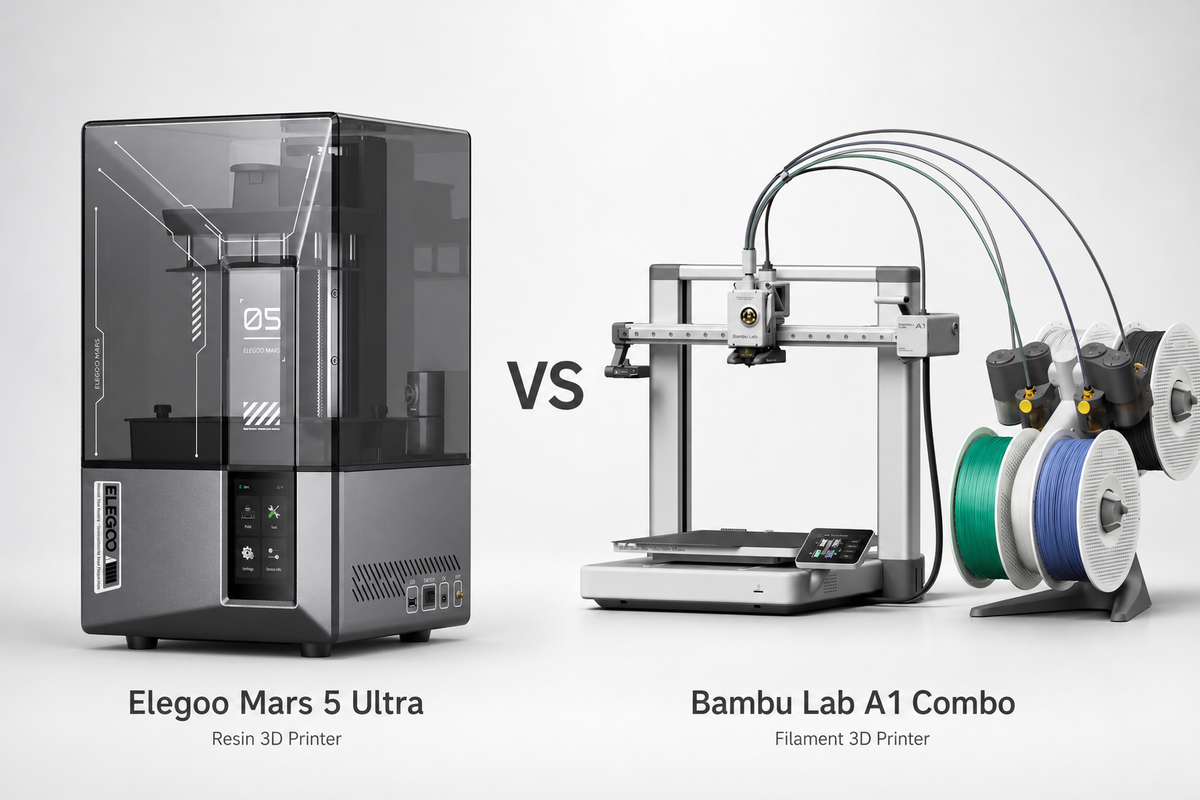
For beginners, one of the major decisions to make is choosing between a resin vs filament 3D printer. Although they look similar, they serve very different purposes. If you're feeling overwhelmed, don't worry; we will simplify this for you.
In this article, we will compare both across 7 key factors to help you decide which one suits your needs best.
Resin vs Filament: At a Glance
The following table breaks down 7 factors between resin 3D printer vs filament:
| Factor | Resin Printer | Filament Printer (FDM) |
|---|---|---|
| Print Detail | Extremely high (25–50 μm layer height) | Good (100–200 μm layer height) |
| Print Size | Small build volume (most under 20 cm) | Large build volume (30 cm+ is common) |
| Material Strength | Brittle (standard resin) | Strong and functional (PLA, PETG, ABS, etc.) |
| Post-Processing | Requires washing and UV curing after every print | Minimal—simply remove the print from the build plate |
| Safety | Uncured resin is toxic; gloves and good ventilation are required | Generally safe for home use; PLA is non-toxic |
| Cost to Start | $150–$300 | $150–$400 |
| Ongoing Cost | Resin, isopropyl alcohol (IPA), gloves, and other consumables | Primarily filament only |
| Best For | Miniatures, jewelry, dental models, and highly detailed prototypes | Functional parts, household items, large prints, and beginners |
If you want to print finely detailed miniatures or figures, get a resin printer. But if you are a beginner and want a smooth experience, go for a filament 3D printer.
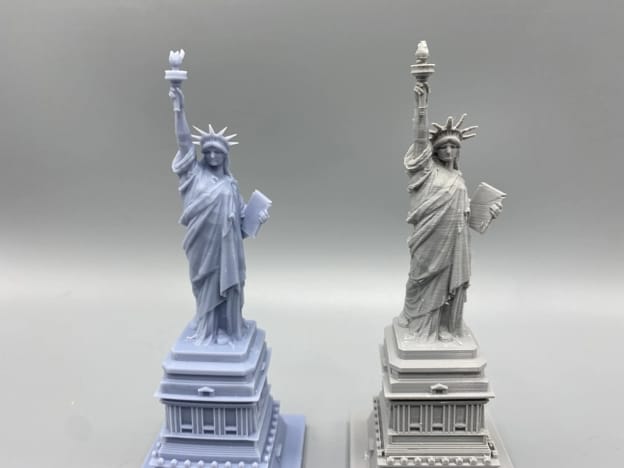
What Is a Resin 3D Printer?
A resin 3D printer builds objects by curing liquid photopolymer resin with UV light, layer by layer. It produces much finer detail, ideal for miniatures, jewelry patterns, and dental models. But it needs post-processing (washing + curing), has a smaller build size, and requires safe handling of toxic uncured resin.
How Does Resin 3D Printing Work?
Resin printing works by curing liquid resin with UV light. Here’s an overview of the process:
- A vat holds liquid photopolymer resin. It is cured in layers using a UV source (LCD screen on MSLA machines, laser on SLA, or projector on DLP).
- The build plate sits at the bottom of the resin vat. After each layer is made, it moves upward. So the model is printed upside down, hanging from the build plate.
- Layers are just 25–50 microns thick. That's the whole reason resin prints look so much sharper than filament prints.
- Today most consumer machines are MSLA: instead of tracing point by point, the LCD screen masks the light so a full layer cures at once.
What is a Resin Printer Good For?
- Miniatures and figurines: Resin printers excel at printing highly detailed models, like D&D characters and Warhammer armies. That’s the number one reason people buy a resin 3D printer.
- Jewelry casting: Jewelers use it to make resin models that are used as patterns in the investment casting process.
- Dental models and aligners: Dentists and dental labs use resin printers to create precise dental models.
In general, resin printing is best for parts that require intricate details and smooth surfaces.
Downsides of Resin 3D Printer
- Uncured resin is toxic: Liquid resin is a skin irritant and gives off fumes, so you should use nitrile gloves and work in a well-ventilated area. If you have pets or children, extra care is needed.
- Post-processing is required for all prints: The prints must be washed in isopropyl alcohol (IPA) or compatible cleaner and then cured under UV light. That adds 15 to 30 minutes to every print and raises costs.
- Limited build volume: Most consumer resin printers can only print objects that are around 15-20 cm tall, making large prints impractical.
- Standard resin is brittle: Resin produces hard, detailed parts, but they can crack or break under stress. There are hard, flexible resins, but they cost more. Hence, it is not suitable for functional or mechanical parts.
- Messier workflow: Printing involves handling liquid resin, cleaning prints, disposing of contaminated materials, and using gloves and paper towels. It’s messier than printing with filament.
- You will need to clean the resin vat regularly and change the FEP film when it is scratched or worn.
What Is a Filament 3D Printer?
A filament 3D printer, also known as an FDM (Fused Deposition Modeling) or FFF (Fused Filament Fabrication) printer, creates objects by melting a plastic filament and depositing it layer by layer.
How Does Filament Printing Work?
- A filament printer heats a spool of thermoplastic filament and pushes the molten plastic out of a heated nozzle. The printer builds the model from the bottom up, layer by layer, until the object is finished.
- The nozzle moves along the X and Y axes while the build plate/print head moves along the Z axis, depending on the design of the printer.
- The layer heights are usually between 100 and 300 microns, making the lines more visible than on resin prints.
- PLA is the standard material for beginners. PETG is more resistant to stress, ABS can handle the heat, and TPU bends without breaking.
What Is a Filament Printer Good For?
Filament printers are best suited for projects where durability and practicality matter more than ultra-fine detail.
- Functional parts: Brackets, phone stands, tool holders, replacement parts, enclosures, and other everyday items.
- Large prints: Most consumer filament printers offer build volumes of around 25–30 cm, making them a good choice for cosplay props, helmets, storage bins, vases, and other larger projects.
- Household projects: Perfect for organizers, hooks, cable clips, drawer dividers, and custom accessories around the home.
- Rapid prototyping: It's cheap to reprint a design after tweaking it
- Learning and education: With a simpler workflow and fewer safety concerns, they are a popular choice for homes, classrooms, and makerspaces.
Downsides of a Filament 3D Printer
- Visible layer lines: Printed parts generally have visible layer lines, particularly on curved surfaces and detailed models. This is one of the biggest drawbacks for miniatures, figurines, and display models.
- Detail limit: Thin walls and small text may not be cleanly reproduced with a standard 0.4mm nozzle.
- Nozzle clogs: The heated nozzle of the filament printer can clog up over time, especially when printing with moisture-absorbed filaments or composite filaments.
- Warping and bed adhesion: Warping and bed adhesion are common, especially with ABS.
- Surface imperfections: Stringing, oozing, blobs, and other print artifacts are common and may need cleanup or modifications to print settings before you get the desired result.
 Ryan Mitchell
Resin vs Filament: Head-to-Head Comparison
Print Quality and Detail
If you're weighing a resin vs filament 3D printer for miniatures, this factor settles it fast. Resin layers run 25–50 microns; filament layers run 100–200 microns. On miniatures, figurines, and jewelry patterns, resin picks up fine detail that filament physically can't produce at normal settings. You can push a filament printer closer with a 0.2mm nozzle and 50-micron layers, but the print takes far longer and still won't match resin's surface finish.
Winner for print quality and detail: Resin
Build Volume and Print Size
The build plates of filament printers are typically around 220×220×250mm, but some can reach 300×300×400mm. Most consumer resin printers top out around 150×80×200 mm. There are bigger resin machines, but they cost more and are still smaller than your average midrange filament printer. Resin isn’t really a viable option if you want to print anything larger than your fist.
Winner for Print Size and Build Volume: Filament
Cost: Upfront and Ongoing
The upfront cost of resin vs filament 3D printer is similar. Entry-level resin printers cost $150–$250, and entry-level filament printers cost $150–$300. The gap is after you purchase. Resin is $25-40/kg, plus IPA for cleaning ($10-15/gallon: you’ll use a lot of it), gloves, FEP film replacements ($5-10 each), and possibly a wash and cure station ($80-150). Filament costs $15-25/kg for PLA, and that's about the only ongoing cost, maybe a new nozzle every few months for a few bucks. The ongoing cost of a resin printer is significantly more.
Winner for total cost of ownership: Filament
Speed
On resin vs filament 3D printer speed, the answer depends on the build plate. Resin printers cure a whole layer at once, so printing one miniature or twenty takes the same amount of time for batches of small objects; resin wins easily. But for one large or medium part, modern filament printers (like the Bambu Lab A1 or P1S) are often faster. Neither has an edge over the other.
Winner for speed: Depends: resin for batches and filament for single large parts
Strength and Durability
Filament wins hands down for resin vs filament 3D printer strength. Standard cured resin is tough but brittle and cracks under stress. It is not suitable for anything load-bearing. Filament, especially PETG, ABS, or nylon, can take real mechanical use. Even PLA, which is a little more brittle, is stiffer and more forgiving than standard resin. There are tougher blends of resin, but they cost 2-3x as much and still don’t compare to filament for functional parts. When it comes to resin vs PLA specifically, PLA is the more forgiving everyday material despite having lower detail resolution.
Winner for strength and durability: Filament
Post-Processing and Daily Workflow
That's the biggest difference between the two hobbies. When you pull a resin print off the plate, you’re not done; wash it in IPA, rinse it, cure it under UV light, pop off the supports, and clean everything you touched. Gloves stay on the whole time. That's 20 to 40 minutes of hands-on work, per print. Pull a filament print off the bed, break supports off, and you’re done in about two minutes. No chemicals, no gloves, and no extra work station.
Winner for daily workflow: Filament, by a wide margin
Safety and Health
Uncured resin is a skin irritant and sensitizer. Repeated skin contact may lead to allergic reactions. Always use nitrile gloves when working with liquid resin. Most resins also give off fumes while printing. You should use it in a well-ventilated room or in an enclosed printer with exhaust ventilation. We do not recommend resin printers to be used in bedrooms or around children and pets without adequate ventilation. Resin is generally safe to touch once it is fully UV-cured. But it shouldn't be used for food-contact items.
PLA filament is made of plant-based substances such as corn starch or sugarcane. It gives off a few fumes and is considered safe for homes, schools, and makerspaces. ABS has stronger fumes and should always be printed with ventilation.
Winner for safety: Filament (especially PLA)
Resin or Filament 3D Printer for Beginners?
If you are a beginner, get a filament 3D printer.
- It’s safer; PLA needs no gloves or ventilation.
- The workflow is easier. Print, wait, remove, done.
- It is more versatile, handling everything from big prints to functional parts, and is cheaper to run long-term.
- You will also have a much larger community of beginners and more resources if you run into problems.
The one exception: If you specifically want to print miniatures, figurines, or jewelry, and you're okay with the added safety steps and cleanup, get a resin printer. It’s just the right tool for the job.
Many hobbyists eventually own both, often starting with filament and adding a resin printer later.
Our Picks: Best 3D Printers for Beginners
Best Filament Printer for Beginners: Bambu Lab A1 Combo
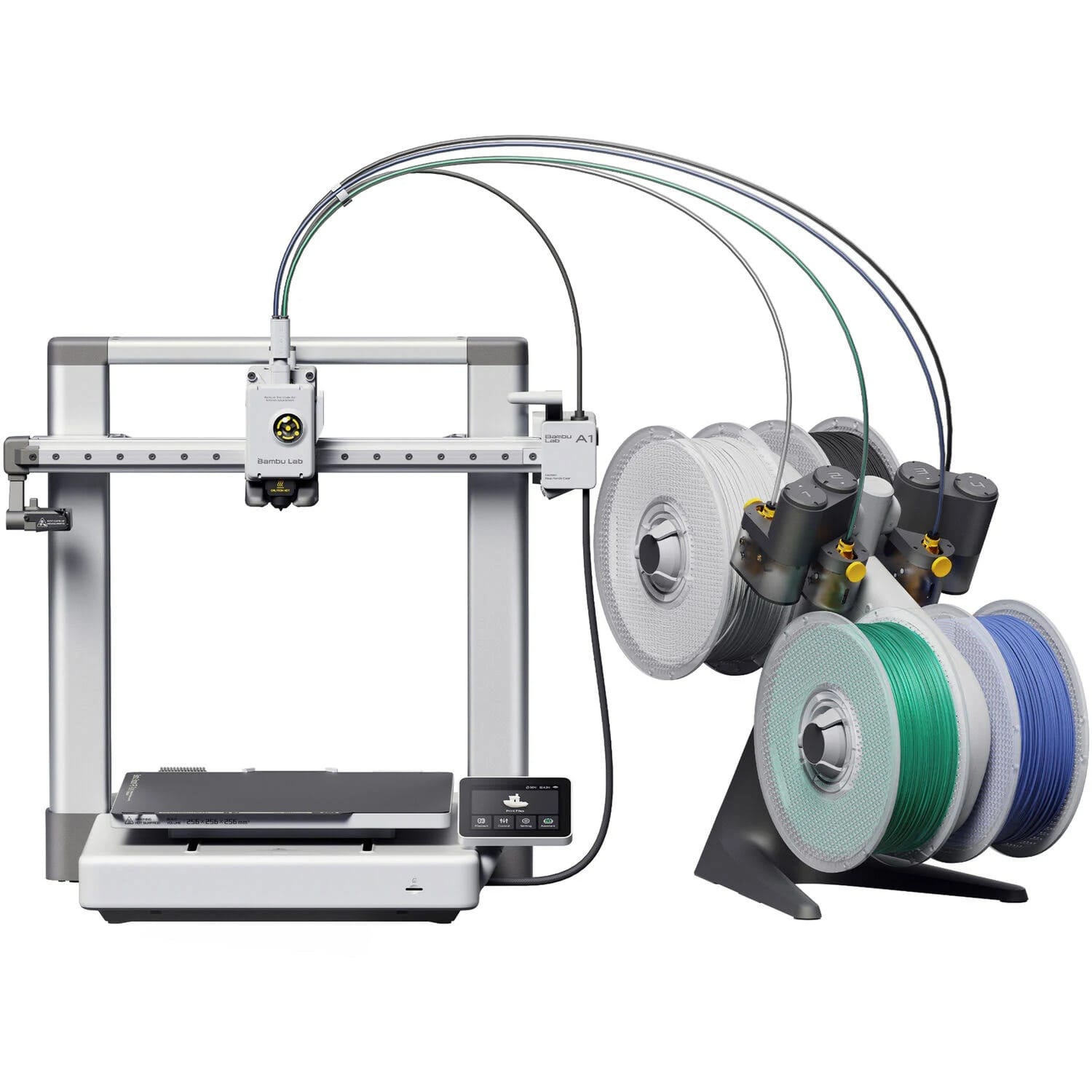
If you decide to go with a filament printer, we recommend the Bambu Lab A1 Combo to get you going.
- Auto bed leveling and calibration: Does not require any manual setup. You just have to unbox, load filament, and print.
- Comes with AMS Lite: AMS gives you multi-color printing right out of the box, a feature that used to be reserved for advanced setups.
- Fast print speeds: Much faster than the older generation of FDM printers.
- Bambu Studio Slicer: Simple for beginners, with pre-tuned profiles so you don’t have to dial in settings yourself.
- Price: ~$300–$400 (Combo with AMS Lite).
Best Resin Printer for Beginners: Elegoo Mars 5 Ultra
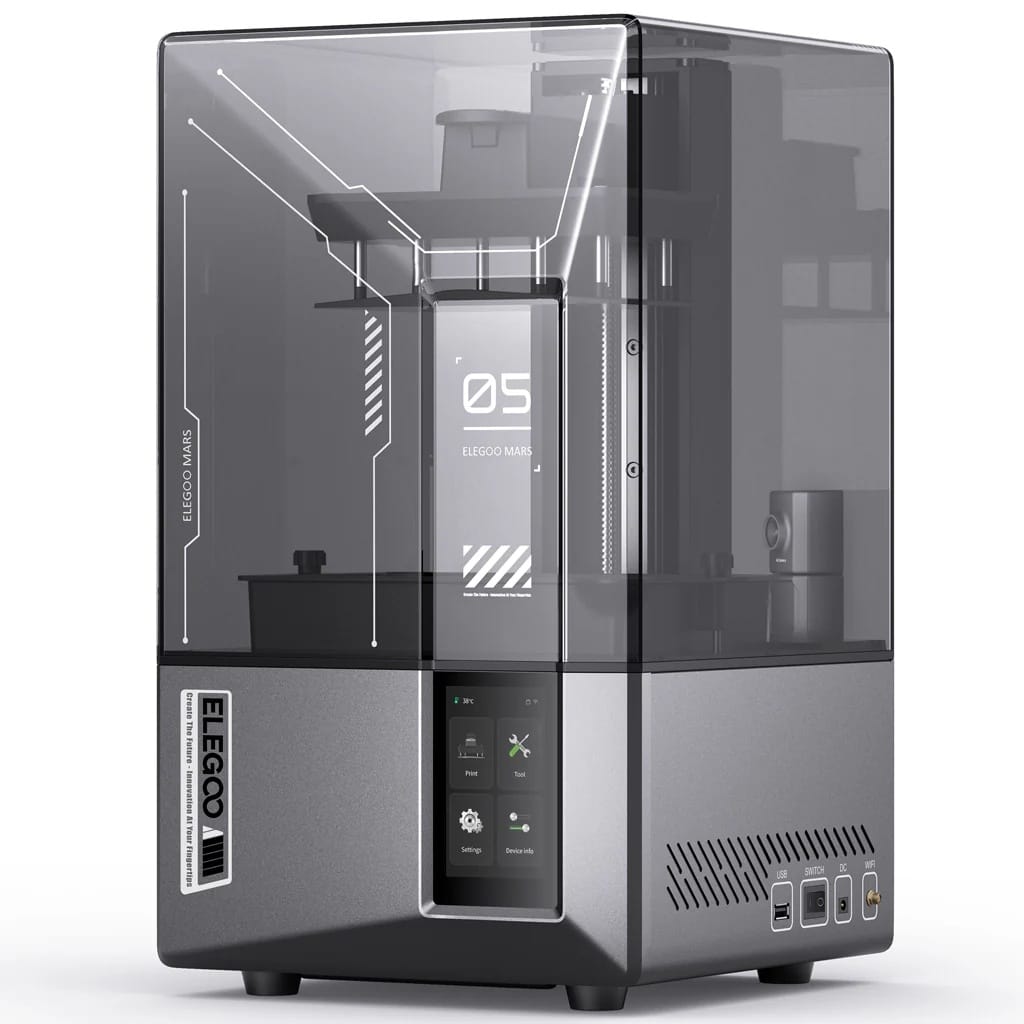
If you know that you want resin for miniatures or detail work, the best entry point right now is the Elegoo Mars 5 Ultra.
- 10K mono LCD: Sharp detail resolution for the price; miniatures come out crisp
- Tilt-release mechanism: Cuts failed prints, the most common beginner headache with resin printing.
- Integrated air purifier: Helps with fumes, though ventilation is still recommended.
- Compact and affordable: Little desk space, solid build volume for miniatures.
- Price: ~$200–$250. You'll also need a wash-and-cure station (~$80–$100), plus resin, IPA, and gloves. You need ~$350–$400 total to get started.
Frequently Asked Questions on Resin vs Filament 3D Printer
Does resin last longer than filament?
It depends upon how and where the printed part is used. For indoor display models, both resin and filament prints can last for many years. The resin is resistant to indoor aging but is more brittle and may yellow after long exposure to sunlight. In general, outdoor or functional parts tend to be more durable when printed in filaments such as PETG and ASA because they handle impact, heat, and UV exposure better than standard resin.
Is resin still toxic after it’s cured?
No. Once cured thoroughly with UV light, resin becomes an inert solid that is safe to handle with bare hands. It is not food safe, however, and should not be used for cups, plates, or anything that comes in contact with food. Uncured liquid resin is still toxic and always needs nitrile gloves.
What is the difference between resin and PLA?
Resin vs PLA comes down to two very different 3D printing materials. Resin is a liquid photopolymer that solidifies when exposed to UV light, while PLA is a solid thermoplastic filament that melts in a heated nozzle. The resin gives you finer detail and a smoother surface, but is more brittle. PLA is more robust, easier to print, and more suitable for beginners and daily functional parts.
What is the "holy grail" of 3D printing?
There is no one “holy grail” of 3D printing today. Most people use the term for a printer that combines the detail of resin with the strength, speed, and ease of filament printing. No consumer printer today can do all of these equally well. The ideal scenario for many makers is to have both a resin printer for detailed models and a filament printer for larger functional parts.
Comments ()